





You typed “free AI chatbot” into a search bar, found a tool that promised a working bot on your site in minutes, and signed up. Three days in, you hit a message cap - or a “remove our branding” upsell, or a credit-card field that wasn’t mentioned on the landing page. The bot was free right up until the moment it started to matter.
Free AI chatbot tools are real, and for a small business they’re a sensible place to start. But “free” describes a usage band, not a gift - and knowing where that band ends is the difference between a useful first deployment and a stalled project. This guide breaks down, honestly, what a free AI chatbot covers, how to launch one on your website, and the point where paying a little starts to make sense.
We run messaging infrastructure for businesses, so we tend to see the after-picture: teams who bolt a free widget onto a site, get early wins, then hit a ceiling the moment a conversation needs to leave the website. We’ll be straight about that line - including where free stops and what’s worth paying for.
What “Free” Actually Means for an AI Chatbot
A free AI chatbot is a conversational AI tool you can put on your website at zero upfront cost - usually a hosted chat widget you embed with a snippet of code. That phrasing hides three very different models, and the one you land on decides what “free” costs you later.
The first is a free tier: free forever, but capped - on conversations per month, on training data, or on features. The second is a free trial: full features for a week or two, then a paid plan kicks in. The third is open-source software: the code is free, but you pay for hosting, setup, and the engineer who keeps it running.
In our experience working with eCommerce and fintech clients, the word “free” rarely describes the bot itself. It describes a usage band - and that band is usually set right where a growing business starts to feel it. A 100-conversation monthly cap is generous for a hobby page and gone by the second week for a store running a promotion.
The mechanism matters because of what happens when you cross the line. Some tools simply stop answering until the next billing cycle. Others quietly degrade - shorter replies, fewer sources - and you find out when a customer says the bot “got dumb,” not when a dashboard warns you. Vendors set caps there on purpose: the free tier is the top of the funnel, not the product.
What a Free AI Chatbot Tier Gives You Out of the Box
A typical free AI chatbot tier is enough to answer common questions on your site, in text, at low volume. It’s a real product, not a demo - but the boundaries are deliberate, and they point a growing business toward a paid plan.
Out of the box, most free tiers give you a hosted chat widget, a no-code builder, training on a limited slice of your content, a capped number of monthly conversations, light customization, and the vendor’s branding on the widget. That’s a working free chatbot for a website - enough to handle FAQs, opening hours, shipping questions, and basic product queries.
Under the hood, most modern bots run on Retrieval-Augmented Generation (RAG) - a method where the bot retrieves relevant snippets from your own content first, then has a language model answer using those snippets. Grounding replies in your material is what keeps the bot from inventing things, a failure mode known as AI hallucination, where a model produces a confident answer that simply isn’t true.
What free tiers almost never include is just as important. You won’t get WhatsApp, Viber, or SMS as channels, no voice, no removal of the vendor badge, no extra team seats, no deep analytics, and no guaranteed response time. Human handoff - passing a stuck conversation to a real agent - is usually limited or absent. None of that should be a surprise; it’s simply where the paid line sits.
It also helps to be realistic about what a bot resolves on its own. Gartner found that chatbots resolved 58% of returns and cancellations but only 17% of billing disputes (Gartner, 2023). A free bot is strong on simple, repeatable questions and weak on anything that needs judgment - which is exactly the right job for it at the start.
How to Launch a Free AI Chatbot on Your Website (Step by Step)
You can build a chatbot free and have it live on your site the same afternoon - no developer required. The work that decides whether it’s any good isn’t the setup; it’s the content you feed it.
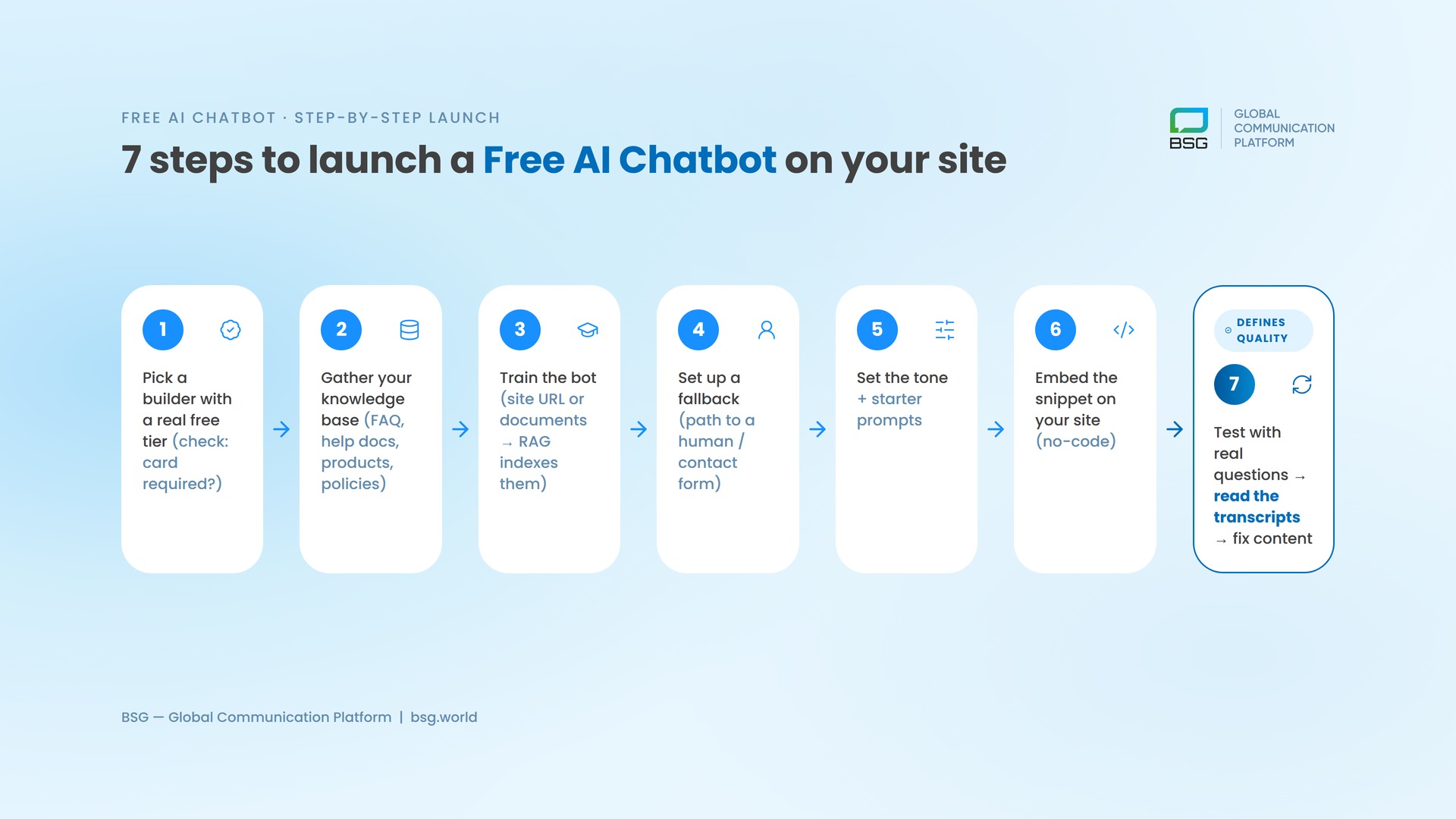
Here’s the sequence we’d recommend to a small team launching their first AI chatbot, no code involved:
- Pick a builder with a genuine free tier - and check whether it needs a credit card to start. “Free, no card” and “free trial, card required” are different commitments.
- Gather your knowledge base: the content the bot answers from - FAQs, help docs, product and policy pages, shipping and returns rules.
- Train the bot: Point it at your website URL or upload your documents; the RAG layer indexes them so answers stay grounded in your material.
- Set the fallback: Decide what the bot says when it doesn’t know - and always give a path to a human or a contact form.
- Customize the tone and add a few starter prompts so visitors know what to ask.
- Copy the embed snippet and paste it into your site, or drop it into a no-code block. The widget goes live without touching your codebase.
- Test with real questions, then read the first week of transcripts. Every wrong answer is a gap in your content, not the bot - fix the source.
The content point isn’t a detail. Gartner reported that 61% of customer service leaders had a backlog of knowledge articles to edit, and many had no formal process for updating outdated ones (Gartner, 2024). A free AI chatbot exposes every one of those gaps within a day, because it answers from whatever you give it.
At BSG, we’ve seen that the teams who get real value from a free website chatbot are the ones who clean their help content first. The bot is a mirror - feed it thin or contradictory docs and it will repeat them confidently to your customers.
One honest constraint: to stay free, keep it text-only on the web. The moment you want the bot to follow up on WhatsApp, send an SMS, or pick up the phone, you’ve left the free tier - those channels are paid, and for good reason.
Free AI Chatbot vs Paid Platforms: An Honest Comparison
The gap between a free AI chatbot and a paid platform isn’t really about the bot’s intelligence. It’s about volume, channels, and what happens when a conversation needs to reach someone who already left your site.
| Criteria | Free AI Chatbot | Paid Platform |
|---|---|---|
| Upfront cost | $0 | Monthly subscription + usage |
| Conversations / month | Capped (low) | High or metered |
| Channels | Website widget (text) | Web + WhatsApp, SMS, Viber, voice |
| Training data | A few URLs or documents | Large knowledge base, multiple sources |
| Human handoff | Limited or none | Built-in routing to live agents |
| Branding | Vendor badge on widget | White-label, your brand |
| Analytics | Basic counts | Full transcripts, CSAT, funnels |
| Compliance & SLA | Best-effort | GDPR, SLA, data controls |
| Best for | Testing, low volume, simple FAQs | Growing volume, omnichannel, regulated industries |
For a free AI chatbot for business at low volume, the left column is usually all you need. The decision point arrives with scale and reach.
In the markets we support, customers don’t live on your website - they’re on WhatsApp, Viber, and SMS, often on a phone with patchy connectivity. A website widget can’t reach them once they close the tab. At BSG, we’ve seen that teams who add SMS or WhatsApp fallback for follow-ups recover conversations a web-only bot simply loses.
That’s the line where a widget becomes infrastructure. When a bot needs to escalate to a human, confirm an order by message, or send a verification code that has to arrive, you’re past what a free tier does. BSG’s AI Support Assistant handles chat and voice with handoff to live agents, Conversational AI Voice takes calls in 150+ languages, and our customer care stack ties messaging channels together - with AI Dialog, our text chatbot, launching soon. None of that is a free website widget, and we won’t pretend it is.
The “Free” Traps - and When It’s Worth Paying
Most “free” frustration comes from a handful of predictable traps. Knowing them upfront saves the setup time you’d otherwise sink into a tool that can’t grow with you.
- No card vs card required: Some tools are free with no card; others ask for one to start a “free” trial and bill you when it ends. Check before you invest hours.
- Branding lock: The vendor badge on the widget is usually free to keep and paid to remove. Fine for testing, less fine on a storefront.
- Conversation caps and overages: Crossing the cap either silences the bot or triggers a charge. Know which it is, and know the reset date.
- Data and training terms: Read whether your conversations train the vendor’s shared models, and whether you can export your own data.
- Channel bait: The web bot is free; WhatsApp, SMS, and voice are paid add-ons. Don’t build a plan that assumes those are free - they aren’t.
When is it worth paying? Usually at one of four moments: volume crosses the free cap, you need a channel customers actually check, you need clean human handoff, or compliance and reliability start to matter. To connect those channels without rebuilding everything, a single integration like One API (developer docs) lets you add SMS, WhatsApp, Viber, or voice through one connection instead of many.
The reassuring part: the first paid step is usually small. Lifting a cap or removing branding is a modest monthly tier, not an enterprise contract. You graduate to paid for reliability and reach - not for a better-looking widget.
Where to Start
If you’re testing the idea, a free AI chatbot on your website is a smart first move - start there, learn from real transcripts, and keep it free while volume is low. The decision that matters comes later, when a conversation needs to reach a customer who already left your site. That’s where reliable messaging across SMS, WhatsApp, Viber, and voice replaces a widget, with handoff to real agents when the bot hits its limits. If that’s the stage you’re planning for, talk to our team about where BSG’s AI support and messaging fit - including AI Dialog, our text chatbot launching soon.
FAQ
Is a free AI chatbot actually free forever?
Some are, within limits. Free tiers stay free as long as you stay under the caps - usually on monthly conversations and training data - while free trials turn into a paid plan after a set period. Confirm which model you’re on before you build.
Can I build a chatbot free without coding?
Yes. Most free AI chatbot builders are no-code: you train the bot on your content, customize it in a visual editor, and paste an embed snippet onto your site. No developer or codebase changes are required to go live.
What’s the catch with a free chatbot for a website?
The catch is the boundaries: capped conversations, vendor branding on the widget, text-only on the web, and limited or no human handoff. None of it is hidden if you check the plan - but it’s set exactly where a growing business starts to need more.
When should a small business pay for an AI chatbot?
Pay when you outgrow the free cap, need to reach customers on SMS or WhatsApp, require reliable human handoff, or have compliance and uptime requirements. The first paid tier is usually inexpensive, so the trigger is need, not budget.


Interested in a special offer?
Ready to reach further?
Let’s talk


Related articles
Companies deciding to employ SMS marketing strategy want to create effective texting lists. For this

Businesses in different countries and cities are going through the coronavirus pandemic variously. Across all
Three agents, one phone, conflicting answers - here's where the WhatsApp Business app ceiling costs eCommerce teams orders.