





For an online retailer in Lagos, Nairobi, Cape Town, or Manila, WhatsApp is rarely a side channel. It's where buyers ask whether a size is in stock, where they send payment screenshots, where they chase a delivery that hasn't moved. A single phone - held by a single person - can handle that for a while, and then stops working long before the team notices.
That's usually the point where someone on the team looks up how to use WhatsApp Business Web. A laptop, a full keyboard, drag-and-drop files - it sounds like the fix. And for a single operator, it is. But the desktop version inherits every structural limit of the free WhatsApp Business app, and for a team handling real eCommerce volume, those limits start costing orders fast.
Here's what WhatsApp Business Web actually does, what it quietly fails at, and the exact signals that tell an eCommerce team it's time to move to a proper WhatsApp setup for eCommerce and retail.
What WhatsApp Business Web actually is
WhatsApp Business Web is the browser version of the WhatsApp Business app. It runs at web.whatsapp.com, mirrors the messages from a single business phone into a desktop window, and pairs to the phone through a QR code scan. WhatsApp has a step-by-step guide to linking a device via QR code in their Help Center. WhatsApp Business allows one primary phone and up to four linked devices per account.
There's also a standalone WhatsApp Business Desktop app for Windows 10 and above and macOS 11 and above, with the same pairing flow and nearly identical features. The browser version works on Chrome, Edge, Firefox, Opera, and Safari. Both are free. Both are tied to one phone number and one underlying WhatsApp Business account.
What WhatsApp Business Web does well for a small eCommerce team
For a solo operator or a two-person shop, the desktop version removes the most obvious friction. Typing on a full keyboard is faster than thumbing replies. Product links drag in from a Shopify or WooCommerce admin tab without routing through email. PDF invoices, product photos, and delivery confirmations upload directly from the computer. Customer information from a CRM sits next to the chat instead of requiring constant app-switching.
For small teams handling a few dozen buyer chats a day, this can noticeably improve daily workflow. Response time is the entire game on WhatsApp - a buyer asking about stock expects an answer in minutes, not hours. In our experience working with eCommerce teams in Lagos and Nairobi, simply moving one operator from the phone to WhatsApp Business Web roughly halves the average time to reply during peak hours. Not because the web version adds features, but because it removes the physical friction of thumb-typing.
Where WhatsApp Business Web stops working
The limits don't hide. They catch teams exactly when the business starts to grow. WhatsApp Business allows one primary phone and up to four linked devices per account. It does not provide advanced automation such as API-triggered order updates, abandoned-cart flows, chatbot logic, CRM workflows, or scalable campaign orchestration.
For the eCommerce teams we work with in South Africa and the Philippines, the ceiling shows up in a predictable pattern. Once a small team crosses roughly 40 to 50 daily order-related chats on WhatsApp, message queues start forming, at least one agent is always locked out of the active session, and the buyer experience drops. Cart abandonment on WhatsApp-sourced orders rises - already a pressure point, given that documented cart abandonment averages around 70% across eCommerce (Baymard Institute, 2024) even before operational delays are layered on top.
Encryption covers the chat - compliance is a different story
End-to-end encryption is applied in both directions on the browser version, and Meta offers Code Verify - a browser extension for Chrome, Firefox, and Edge that checks the WhatsApp Web client hasn't been tampered with. For the chat session itself, the security model is reasonable.
The harder question isn't encryption. It's compliance posture. Based on what we observe across the campaigns we support, the compliance gap is the quietest but fastest reason brands outgrow the free version. Under Nigeria's Data Protection Act 2023, South Africa's POPIA, and the Philippines' Data Privacy Act in the Philippines, businesses are expected to produce access logs, storage controls, and documented data flows on request. The free WhatsApp Business app - browser version included - cannot produce any of that. For a brand handling payment references, delivery addresses, or ID details on WhatsApp, that's the real limit.
How to set up WhatsApp Business Web on browser, Windows, and Mac
Before pairing, confirm which phone number the team will use as the main WhatsApp Business number in the long term. Swapping the number later breaks the linked-device setup and requires re-verification of the business profile - a small detail worth catching up front.
The setup itself is the same across the three surfaces:
- Install the latest WhatsApp Business app on the business phone.
- On the computer, open a browser to web.whatsapp.com, or download WhatsApp Business Desktop from the Microsoft Store, the Mac App Store, or the official WhatsApp site.
- On the phone, open WhatsApp Business, go to the menu, then Linked devices, then Link a device.
- Scan the QR code that appears on the computer.
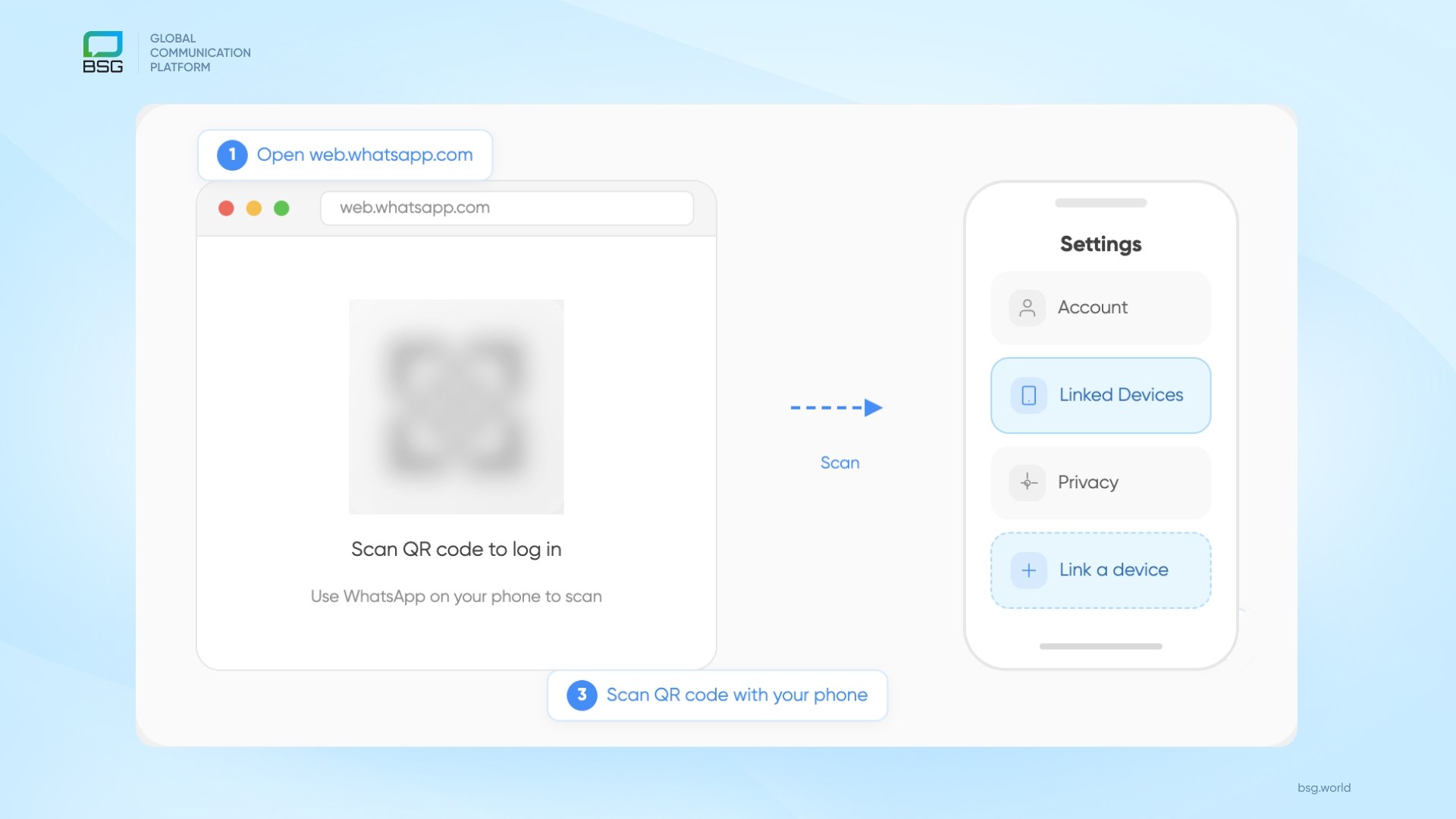
Messages sync instantly. The desktop app adds a few things the browser version doesn't - keyboard shortcuts, chat export, and native voice and video calling - but for daily eCommerce work, the functional difference is minor. Pick whichever matches the team's workflow.
When an eCommerce team should move beyond WhatsApp Business Web
There's a practical threshold. If more than one team member needs WhatsApp access every day, or if WhatsApp is carrying more than about 40 to 50 order-related chats daily, the free desktop version has already been outgrown. At that volume, missed replies translate into lost orders, and the lack of integration forces agents to re-type information that already lives in the storefront.
For the eCommerce brands we work with in target markets, moving from the free WhatsApp Business app to a WhatsApp Business API setup with a multi-agent inbox consistently lifts pre-purchase conversion. Buyers no longer wait hours for stock and delivery answers, and the team no longer loses sales to response time. For low-connectivity markets, the same API setup usually gets paired with SMS as a delivery fallback so that a buyer who doesn't receive a WhatsApp message still gets the order update over SMS - a small operational detail that closes one of the most common revenue leaks in the region.
FAQ
Can multiple users log in to WhatsApp Business Web at the same time?
Not in the way a support team needs. One phone number can be linked to up to five devices, but the browser version specifically allows only one active session at a time. Two agents cannot open the same business account in two different browsers and answer buyers in parallel. One of them will be kicked out.
What's the difference between WhatsApp Business Web and WhatsApp Business API?
WhatsApp Business Web is a free browser extension of the mobile app, tied to one phone, with no automation or integration. WhatsApp Business API is the commercial version accessed through an approved Business Solution Provider - it adds multi-agent inbox, message templates, marketing broadcasts, order-flow automation, CRM and eCommerce integration, and compliance controls. A deeper channel-by-channel comparison is covered in this breakdown of SMS, Viber, and WhatsApp for business.
How many devices can I connect to WhatsApp Business at once?
Up to five devices per phone number - that total includes the WhatsApp Business Web browser session and the WhatsApp Business Desktop app. In practice, the one-active-browser-session-per-account rule is usually the harder limit for teams, not the five-device cap itself.
If the team has outgrown the free version
At BSG, we've seen eCommerce teams connect their WhatsApp Business API inbox directly to Shopify or WooCommerce, so order confirmations, shipping updates, and abandoned-cart follow-ups fire automatically - with the same buyer continuing the same WhatsApp conversation, just without a human typing every message. The teams that do this well don't rip out the free version in one weekend; they map the volume, the agents, the compliance requirements, and the channel mix first, then move. If the team has outgrown the desktop app and wants to plan that move before switching, talk to our team. We work through the channel setup, the compliance posture, and the integration list that actually fits the market - not a generic deployment that assumes Western buyer behaviour.


Interested in a special offer?
Ready to reach further?
Let’s talk


Related articles

As the holiday season approaches, bringing cozy evenings with loved ones and the joy of

There have been changes to customer preferences in their interaction with brands in recent years.

According to statistics, the Black Friday and Cyber Monday (BFCM) season generated $222.1 billion in