




AI Voice Assistant for Sales & Support: The Complete Guide [2026]

Your best sales reps spend the opening minute of every call confirming who they reached and why. Your support line spikes at 9 a.m. and again after every incident, and the overflow lands in voicemail or gets abandoned. Adding headcount clears the queue for a quarter — then the same math returns, because call volume grows with the business and salaries grow with it.
An AI voice assistant breaks that link. It answers or places the call, works out what the person actually needs, completes the task through your systems, and passes a context-rich call to a human only when judgment is required. This is not an IVR with a friendlier voice — it is software that holds a real conversation and takes real action.
This guide is for Heads of CX and Sales who are past “is this real?” and are deciding whether to deploy. We cover what an AI voice assistant is versus the IVR you already run, the pipeline that makes it work, the sales and support use cases that pay back fastest, how to stand it up with BSG, and the metrics that keep it honest.
At BSG, we’ve seen that the teams who get value fastest don’t try to automate every call in week one. They pick two or three high-volume, low-variance call types — order status, appointment confirmations, lead qualification — prove containment on those, and expand from evidence rather than ambition.
What an AI Voice Assistant Is (vs IVR)
An AI voice assistant is software that holds a spoken conversation on the phone: it listens, works out intent, decides what to do, and replies in natural speech. Set that against IVR (Interactive Voice Response) — the press-1-for-sales menu tree most contact centers still run. IVR routes calls; an assistant resolves them. That single distinction is where the cost and satisfaction differences come from.
IVR breaks in predictable ways. Callers don’t know which branch holds their problem, so they guess, misroute, and mash zero to reach a human — which drops an unqualified call onto an agent with no context. Every layer you add to the menu to cover more cases makes the tree harder to navigate, not easier. The design fights itself, and callers feel it.
A voice assistant removes the menu. The caller states the reason for calling in their own words, and the system maps that to an intent and an action — checking an order, booking a slot, qualifying a lead, taking a payment. BSG’s Conversational AI Voice was built as a standalone voice product for exactly this: natural dialogue with emotional tone detection across 150+ languages, not a scripted phone menu wearing a nicer voice.
| Criteria | IVR (menu tree) | AI Voice Assistant |
|---|---|---|
| Input method | Keypad / fixed voice menu | Natural spoken language |
| What it does | Routes the call to a queue | Understands intent and completes the task |
| Handles variation | No — caller must fit the menu | Yes — caller explains in their own words |
| Context to agent | None — cold transfer | Full call context passed on escalation |
| Languages | One per menu build | 150+ with natural speech |
| Best for | A few rigid, high-volume flows | Any call with variation or a clear action |
You don’t have to rip out the IVR to start. The practical migration is to sit the assistant in front of the menu: it takes the call, understands the request, and only falls back to the old tree for the narrow set of flows you haven’t automated yet. That protects the working parts of your current setup while you move volume off the menu one intent at a time — which is also how you keep the finance conversation grounded in measured results rather than a big-bang promise.
In our experience working with contact-center teams, the honest framing is this: IVR is still fine for a handful of rigid flows where the caller’s options are genuinely limited — a bank’s “lost card, press 1” line, for instance. Everything with variation, where people explain a situation rather than pick from a list, is where the menu quietly costs you containment and CSAT. That is the part worth automating first.
How It Works — STT → LLM → TTS → Action
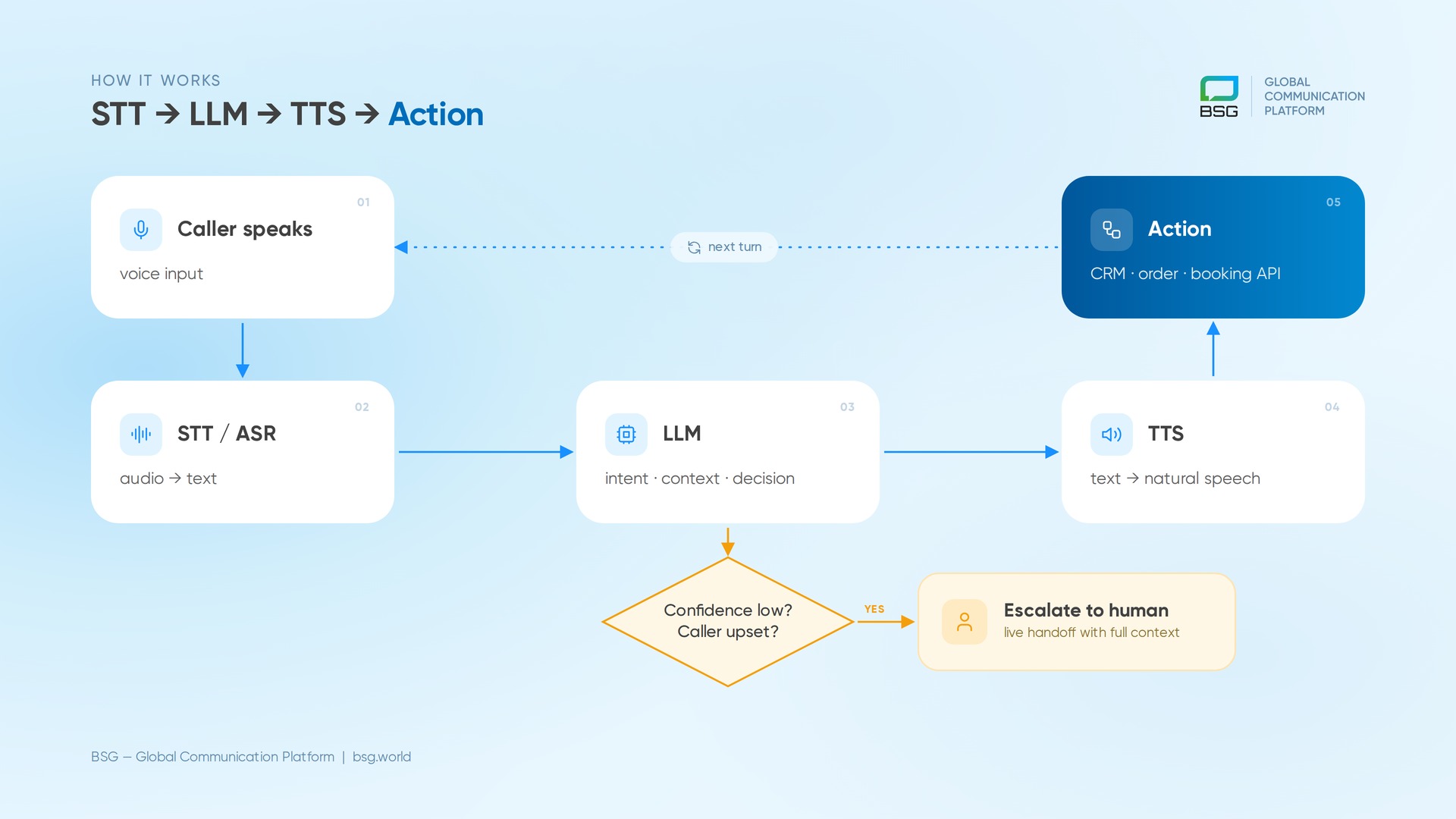
Under the hood, an AI voice assistant runs a four-stage loop on every turn of the conversation. Knowing the stages matters, because each one is where quality — or latency — is won or lost.
First, speech recognition (STT/ASR) converts the caller’s audio into text in real time. Then a large language model (LLM) interprets that text: it identifies intent, tracks context across the whole call, and decides the next step. Next, text-to-speech (TTS) turns the model’s response back into natural spoken audio. Finally — the stage that separates a demo from a deployment — the assistant takes an action: a call to your CRM, order system, or booking API to actually do the thing the caller asked for.
The stage most teams underestimate is latency. If the round trip from speech to reply runs long, the caller talks over the assistant or assumes the line dropped. Good systems also handle barge-in — letting the caller interrupt mid-sentence, the way people talk to each other. Without it, the interaction feels like a recording, and callers disengage within a couple of turns.
Speech quality is also a market question, not just an engineering one. Accents, background noise, and code-switching between languages all stress the recognition stage, and a system tuned on one accent set degrades on another. This is why 150+ language coverage with natural speech is a real capability line, not a spec-sheet number — it decides whether the assistant works for the markets you actually serve.
The model stage also owns a decision you can’t skip: when to stop. A good deployment defines confidence thresholds and escalation triggers — if intent is unclear, if the caller is upset, or if the request falls outside the automated set, the assistant hands off to a human with the transcript and context attached. Getting these rules right is what keeps automation from becoming a wall the customer has to climb over to reach a person.
The action stage is what makes voice AI a business tool rather than a talking FAQ. “Your order shipped this morning and arrives Thursday” only works if the assistant pulled that from your order system live. At BSG, we’ve seen that deployments stall not on speech quality — that’s largely solved — but on how cleanly the assistant is wired into the systems of record. Integration is the project; the voice is the easy part.
Use Cases — Outbound Sales, Inbound Support, Retention Calls
The use cases that pay back fastest share a shape: high volume, repeatable structure, and a clear action at the end. Three categories cover most of what CX and sales teams deploy first.
Outbound sales and lead qualification
A voice assistant calls inbound leads within seconds of a form fill, confirms interest, qualifies against your criteria, and books the ones worth a rep’s time. Speed matters more than most teams admit — a lead reached in the first minute converts at a different rate than one called an hour later. This is where AI lead qualification earns its keep: reps stop burning hours on unqualified lists and open their calendars only to leads the assistant has already vetted and scored.
Inbound support
Order status, delivery windows, appointment changes, password and account questions — these are high-volume, low-variance calls that don’t need a person. Routing them to an AI support assistant frees agents for the calls that genuinely need judgment, and it holds the line open at 2 a.m. when your team is offline.
One support team we onboarded pointed a narrow set of repeat questions at the assistant. After a two-day setup, it was resolving roughly 40% of those repeat requests inside a week without a live agent. The agents didn’t lose work — they lost the boring half of it, and their queue for complex cases got shorter because the noise was gone.
The economics are what make finance pay attention. Industry estimates put a live-agent call at roughly $3 to $6.50, against a few cents for an automated interaction (DMG Consulting). Take a support line handling tens of thousands of calls a month, move even a third of them to automation, and the monthly saving is the difference between hiring another shift and not needing to. The point isn’t that people are expensive — it’s that spending agent time on “where’s my order” is the wrong place to spend it.
Retention and reactivation
Renewal reminders, lapsed-customer win-backs, and payment-failure follow-ups are calls teams know they should make and rarely have capacity for. A voice assistant runs them at volume, detects tone, and escalates the ones showing frustration or churn risk to a human before the account is lost. Based on what we observe across the campaigns we support, the pattern that works is narrow-then-wide: automate one call type completely, measure it honestly, and only then add the next.
Setup with BSG — Number / SIP, Configure Flow
Standing up a voice assistant with BSG is less work than most teams expect, because the telecom layer is already handled. There are three moving parts.
First, the number. You either get a new voice-enabled number from BSG or connect your existing telephony over SIP — the signalling protocol that carries calls between your systems and the network. If you already run a PBX or contact-center platform, SIP trunking lets you keep your numbers and route only the calls you want to automate to the assistant.
Second, the flow. You define the intents the assistant should handle, the action behind each one, and the escalation rules — when to hand off to a human and what context to pass along. This is where your CRM and order systems get wired in, so the assistant can read and write real data mid-call rather than reciting a script.
Before you point live traffic at it, test on real call recordings and edge cases — accents, noisy lines, callers who change their mind mid-sentence — and check how the assistant handles the calls it should escalate, not just the ones it handles cleanly. Two other things belong on the setup checklist for regulated industries: how call audio and personal data are stored and processed, and whether recording and consent rules for your markets are met. These are answerable questions, but they are cheaper to answer before launch than after.
Third, the fallback path, which we cover next. Because BSG runs its own infrastructure as a CPaaS provider — direct carrier connections and in-house routing — the voice assistant, the messaging channels, and delivery all sit on one platform rather than stitched across vendors. That is what makes the cascade below a configuration step, not a second integration project.
Cascade — Voice → WhatsApp → SMS Fallback
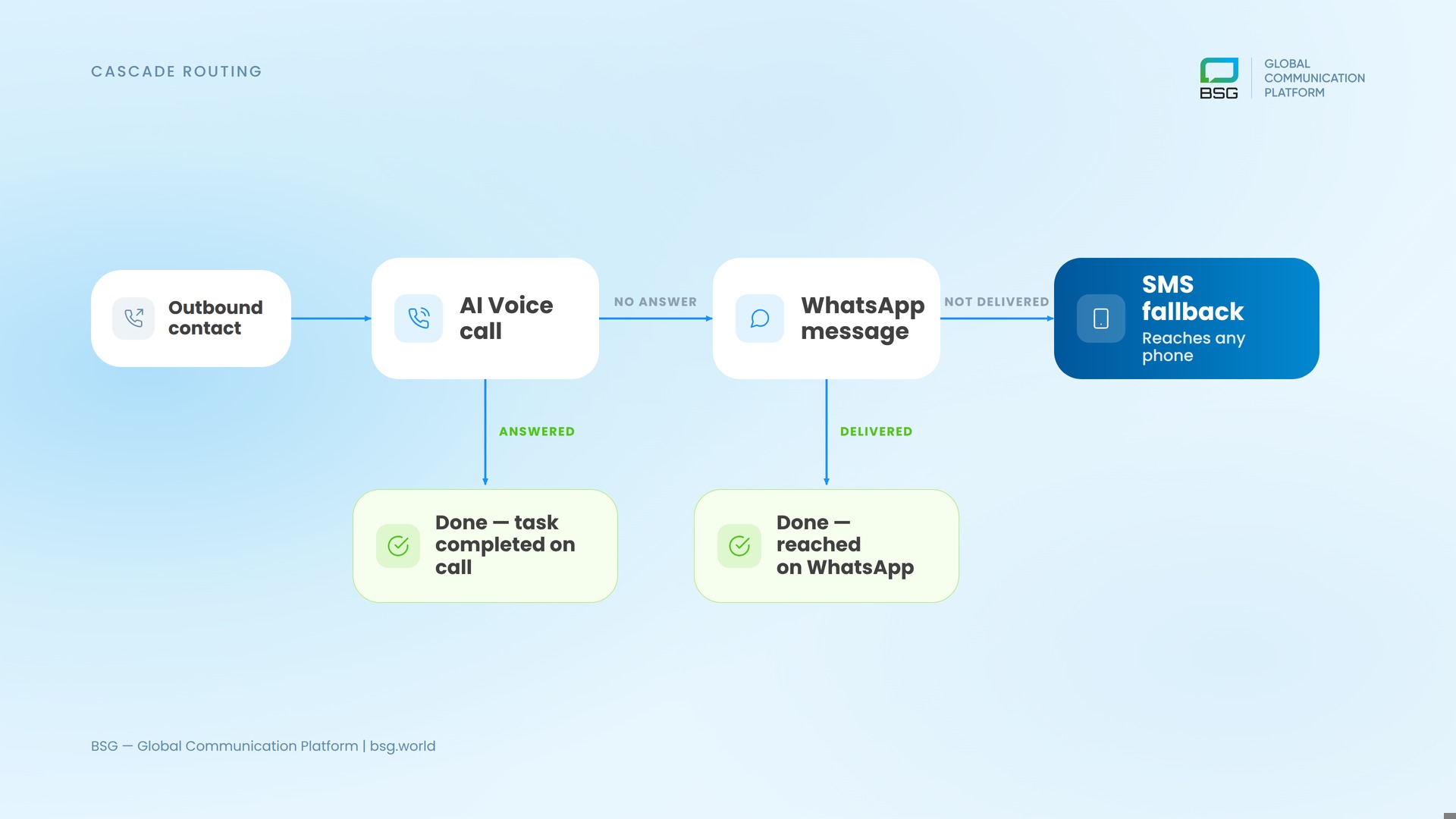
Not every call connects. Numbers go to voicemail, people don’t pick up unknown callers, and outbound campaigns hit contacts who simply aren’t reachable by phone right then. A voice-only approach loses those contacts. A cascade doesn’t.
Cascade routing means the system tries channels in order and falls through automatically when one fails. For an outbound flow: the voice assistant places the call; if it isn’t answered, the same message drops to WhatsApp; if WhatsApp isn’t available, it falls back to SMS, which reaches essentially any phone. The contact gets the message on whatever channel actually works, and you stop paying for dead-air call attempts.
At BSG, we’ve seen that adding an SMS fallback under a voice or messaging campaign recovers a meaningful share of contacts a single channel would have lost — and it matters most in mobile-first markets, where a missed call rarely gets a callback but a text still gets read. Because voice, WhatsApp, and SMS all run on the same BSG platform, the cascade is a rule you set, not a build you commission.
ROI & Metrics
The business case for an AI voice assistant is a labor-cost argument, and the market data points the same direction. Gartner projects that conversational AI in contact centers will cut agent labor costs by $80 billion in 2026, with one in ten agent interactions automated (Gartner, 2022). Further out, Gartner expects agentic AI to autonomously resolve 80% of common customer service issues by 2029, driving a 30% cut in operational costs (Gartner, 2025). And by 2028, at least 70% of customers will begin their service interactions through a conversational AI interface (Gartner, 2025).
Those are industry figures — your own numbers are what matter. Track these on every deployment:
| Metric | What it tells you |
|---|---|
| Containment rate | Share of calls resolved without a human agent |
| First-contact resolution (FCR) | Whether the issue was actually solved, not deflected |
| Average handle time (AHT) | Speed per call — for the assistant and for escalations |
| CSAT | Customer satisfaction — the guardrail against over-automation |
| Cost per contact | Automated call cost vs a live-agent call |
| Conversion / booking rate | For outbound sales and lead qualification flows |
For payback, the honest way to model it is per automated call: multiply the calls the assistant handles by the loaded cost of a live-agent call, subtract the per-minute cost of automation and the setup effort, and you have a number that moves with volume. On outbound, add the revenue side — faster lead contact and higher booking rates — which for sales teams often outweighs the support savings. The deployments that disappoint are the ones that chased a headline automation rate without wiring the assistant to the systems that let it actually finish a task.
The trap is measuring containment alone. A high automation rate with falling CSAT means the assistant is closing calls it should have escalated. Watch containment and satisfaction together — the goal is calls resolved well, not just calls marked resolved. A voice assistant that deflects an angry customer into a worse experience is not saving you money; it is deferring a churn cost.
Which Should You Choose — IVR, Voice Bot, or AI Voice Assistant?
There is no universal answer — it depends on what the call actually has to do. Three tools sit at different points on the same line, separated by how much the system decides on its own:
- If your goal is simply to send a caller to the right department, a well-configured IVR is enough. It reads a fixed menu, takes a keypress, and transfers the call — cheap and predictable for simple, high-volume routing.
- When you need to dial a base fast or collect a plain Yes/No from thousands of contacts — a confirmation, an opt-in, a reminder — a scripted voice bot handles it without tying up agents.
- When you want to scale support and lead intake and take routine calls off your team — qualify leads, resolve requests, book meetings across varied, open-ended conversations — you need an AI voice agent that understands intent and completes the task, not just a script.
In practice most teams run more than one: an IVR for the simplest routing, an AI voice agent for anything with variation, and a messaging cascade to catch what voice cannot close. BSG runs all three on one platform, so you match each call type to the right tool instead of stitching vendors together. If you want to map your own call mix, book a callback with our team.
Launch Your AI Voice Agent with BSG
If you’re weighing a voice deployment, start narrow: pick the two or three call types that eat the most agent hours, and prove containment there before you widen scope. That is the fastest path to a number your finance team believes.
BSG runs the voice assistant, the messaging cascade, and the carrier connections on one platform, so you’re configuring a workflow rather than integrating four vendors. If you’re working on sales or support automation and want to pressure-test whether it fits your call mix, talk to our team — we’ve deployed this across CX and sales teams and can tell you honestly where it pays back and where it doesn’t.
FAQ
What’s the difference between an AI voice assistant and a chatbot?
A chatbot handles text; an AI voice assistant handles spoken phone calls in real time, which adds speech recognition, text-to-speech, and strict latency requirements. The intelligence layer can be similar, but voice is far less forgiving — a two-second delay that’s invisible in chat breaks a phone conversation.
Can an AI voice assistant replace human agents?
It replaces specific call types — high-volume, repeatable ones like order status or lead qualification — not the agents themselves. The realistic model is that the assistant handles volume-based work and escalates anything needing judgment to a human with full call context, so agents spend their time where it counts.
How long does it take to deploy an AI voice agent?
A narrow first use case can go live in days once the number and system integrations are in place; the timeline is driven by how cleanly the assistant connects to your CRM and order systems, not by the voice technology itself. Broad, multi-intent deployments take longer, as each new flow is built and tuned.
What languages does BSG’s AI voice assistant support?
BSG’s Conversational AI Voice handles natural dialogue in 150+ languages with emotional tone detection — which matters for teams running support or sales across several markets from one platform, without a separate build per language.


Interested in a special offer?
Ready to reach further?
Let’s talk


Related articles
According to Google’s data from 2023, there are over one billion monthly active users with

In the last two decades, the risks of cybersecurity breaches have surged akin to an

The holiday season, with its festive spirit and heightened shopping with its festive spirit and