




WhatsApp Business API: Complete Guide — Setup, Pricing, Use Cases [2026]

Update — October 1, 2026: Meta has changed WhatsApp Business API rates again. Some of the pricing figures below may be out of date; check Meta's official pricing page for current numbers before finalizing your cost model.
Most teams reach the WhatsApp Business API at the same moment: customer messages arrive faster than a shared inbox or a single phone can handle, and the channels that used to work — email, app push — are quietly losing reach. For a CTO or Head of Product deciding where engineering time goes, the question is rarely whether to be on WhatsApp. It is what the API actually requires, what it costs at real volume, and where it pays off.
This guide answers those three questions in order: setup, pricing, and use cases. It is written for mid-market and enterprise teams making an integration decision, not looking for a definition. With roughly three billion people on WhatsApp as of early 2025 (Statista, 2025), the reach is not in doubt. What matters is connecting to it cleanly — and what it does to your numbers once you do.
We cover the difference between the API and the consumer app, the full access path through Meta, how the per-message pricing model works after Meta's 2025 change, and the use cases that earn their place by industry.
What Is WhatsApp Business API (and How It Differs from the WhatsApp Business App)
The WhatsApp Business API is the programmatic interface to the WhatsApp Business Platform — Meta's infrastructure for businesses to send and receive messages at scale. It has no app of its own. You connect it to your systems, a CRM, or a provider's platform, and it moves messages through code rather than a screen.
That last point is where most confusion starts. The WhatsApp Business app — the free download — is built for a small team tapping replies on a phone. It tops out fast: one device, manual handling, no real automation. The API is the opposite. It runs on servers, supports many agents and automated flows at once, and connects to the tools you already operate.
A practical way to draw the line: the app is a phone, the API is a switchboard. If you send order updates to 50,000 customers, route support into a help desk, or trigger authentication codes from your backend, you need the API. If you answer a dozen chats a day, you do not.
What the API unlocks is less about messaging and more about workflow. A single business number can be worked by a whole support team at once, conversations can route by topic or language, and messages can fire automatically the moment an order ships or a payment clears. None of that is possible on the app, and it is exactly what mid-market volume demands.
Because the API has no interface, you reach it through a Business Solution Provider (BSP) — a Meta-approved partner that supplies the connection, message templates, delivery reporting, and compliance handling. Choosing that partner is the first real decision, and it shapes everything downstream.
How to Get WhatsApp Business API Access — Step by Step
Getting live on the API is a sequence, not a switch. The steps below are the same regardless of provider; what changes is how much of the work the provider absorbs. At BSG, we've seen that the teams who move fastest prepare their Meta business-verification documents before they start — that single step causes most of the delays we observe.
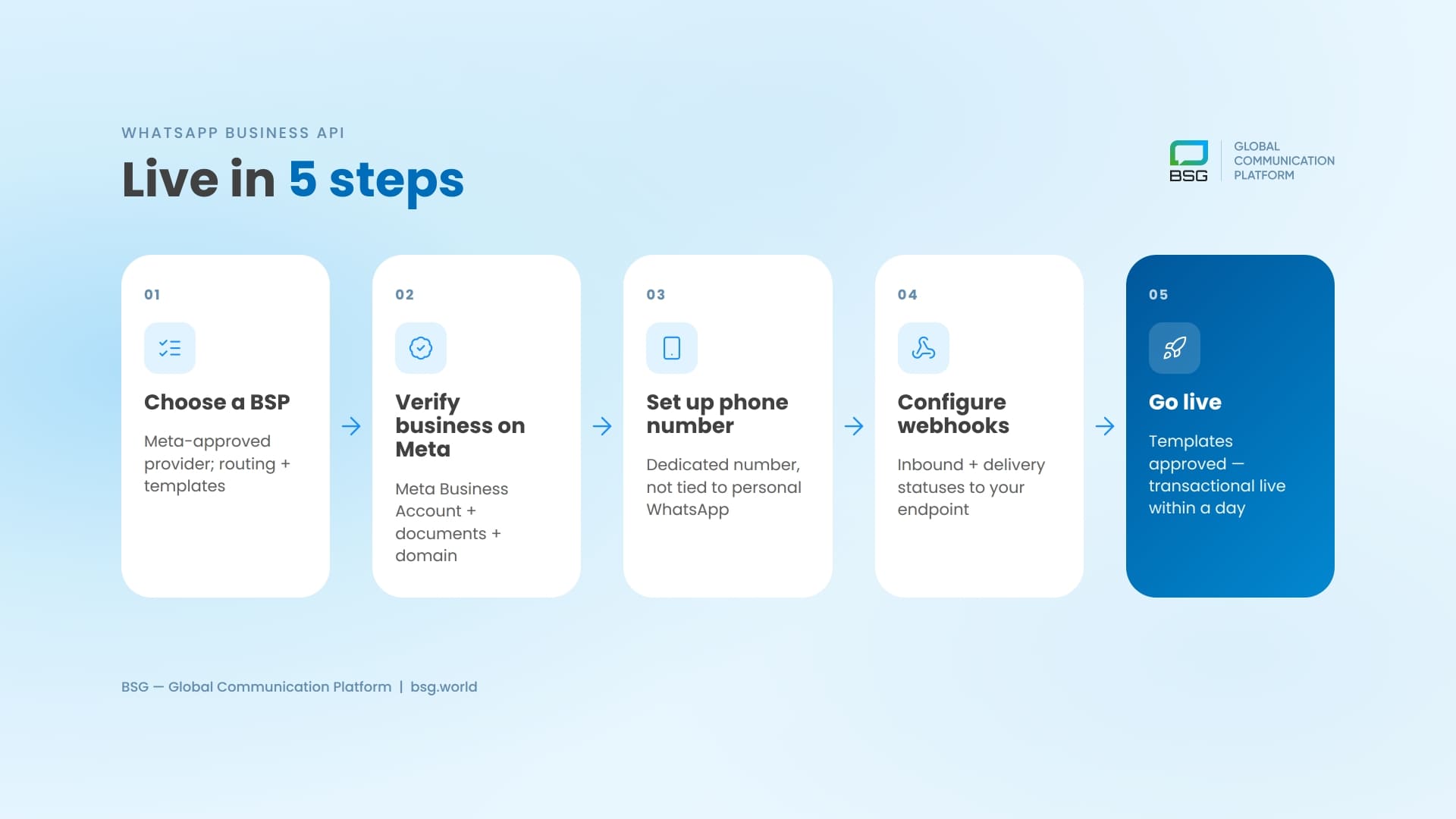
Choose a BSP (Business Solution Provider)
Your BSP sits between your systems and Meta. A good one handles number provisioning, template approval, delivery analytics, and routing — and connects WhatsApp to your other channels so you don't integrate each one separately. A weak one hands you a raw connection and leaves the rest to your engineers.
For mid-market and enterprise teams, the questions that matter are concrete: does the provider run its own infrastructure or resell someone else's, what delivery guarantees does it commit to, and can it fall back to another channel when a WhatsApp message can't land. A provider that operates its own platform and direct carrier routes treats fallback as built-in, not an afterthought.
Verify Your Business on Meta
Meta requires a verified business behind every API account. You register a Meta Business Account, submit business documentation, and confirm ownership of your domain and brand. This is where the verified business name and the green badge come from — and where unprepared teams lose a week. Have your legal entity name, business documents, and a domain you control ready before you begin.
Set Up a Phone Number
The API needs a dedicated phone number that isn't already tied to a personal WhatsApp account. It can be new or ported, but once it's bound to the API it leaves the consumer app behind. Through your BSP you register the number, set the display name, and complete Meta's number verification.
Configure Webhooks and Go Live
The final step is technical and short. You point Meta's webhooks at your endpoint to receive inbound messages and delivery statuses, connect the sending API to your backend, and submit your first message templates for approval. Marketing and utility templates pass through Meta review; transactional flows can be live within a day once templates clear. A provider with clear developer documentation is the difference between a half-day integration and a stalled one.
Inbound handling is what turns WhatsApp from a broadcast tool into a two-way channel: replies, button taps, and quick responses all arrive at your endpoint in real time, ready to route into support or trigger the next step in a flow. Getting this right at setup is what lets you use the free service window later instead of paying for every outbound message.
WhatsApp API Pricing Explained — The Per-Message Model (2026)
Here is the change that catches most teams off guard. As of July 1, 2025, Meta retired conversation-based pricing and moved to a per-message model (Meta, 2026). Under the old system, one fee covered any number of template messages inside a 24-hour window. Now each delivered template message is billed on its own. If your cost model still assumes "pay once per conversation," it is wrong — and your forecast will be off.
This matters more than it sounds. A campaign that sent five follow-ups in a day used to cost one conversation fee. Today it costs five message fees. The math of every broadcast, drip, and reminder flow changed, and teams that didn't re-model their costs met a surprise on the invoice.
Consider a typical post-purchase flow: an order confirmation, a shipping alert, an out-for-delivery note, and a review request. Three of those are utility messages and one is marketing. Under per-message pricing, classifying each correctly — and sending the review request inside an open service window rather than as a fresh template — can change the cost of the same flow by a wide margin. The flow didn't change; the billing logic did.
How Message Categories Work (Marketing, Utility, Authentication, Service)
WhatsApp prices messages by category, and the gap between categories is wide. Marketing messages — promotions, broadcasts, re-engagement — are the most expensive. Utility messages — order updates, shipping alerts, payment confirmations — and authentication messages — login and verification codes — cost a fraction of marketing rates. Service messages, the replies a customer initiates, are free (Meta, 2026).
Rates also depend on the recipient's country, not yours. The same marketing message can cost several times more in higher-priced markets than in lower-priced ones (Meta, 2026). For any business sending across markets, that variance belongs in the model from day one — a single blended "cost per WhatsApp message" hides where the budget actually goes.
| Category | Relative cost | Billed? | Free window? | Best for |
|---|---|---|---|---|
| Marketing | Highest | Yes, per message | No — always billed | Promos, broadcasts, re-engagement |
| Utility | Low | Yes (free inside open service window) | Yes — within service window | Order updates, shipping, payment confirmations |
| Authentication | Low | Yes, per message | Limited | Login & verification codes (OTP) |
| Service | Free | No | Yes — 24h, customer-initiated | Replies to customer-initiated chats |
Free Windows and Free Entry Points
The model rewards conversations the customer starts. When someone messages your business, a 24-hour service window opens during which your replies are free. Utility templates sent inside that open window are free too — a meaningful shift from the old model.
There is also the free entry point: when a customer reaches you through a Click-to-WhatsApp ad or a Facebook Page button, you get a 72-hour free messaging window instead of 24. Routing acquisition through these entry points creates blocks of zero-cost messaging — which is why the cheapest WhatsApp strategy is often a customer-initiated one.
Cost Optimization Tips
Three moves cut WhatsApp bills without cutting reach. First, keep transactional traffic — order updates, alerts, codes — in the utility and authentication categories rather than dressing it as marketing. Second, design flows that open and use the free service window instead of firing fresh marketing templates. Third — and this is where infrastructure earns its keep — add a fallback channel so you aren't paying to retry messages WhatsApp can't deliver. For the businesses we work with in mobile-first markets, SMS fallback consistently recovers transactional messages that would otherwise fail silently, at a lower per-message cost than repeated WhatsApp attempts.
Top WhatsApp Business API Use Cases by Industry
The API earns its place differently in each sector. What follows are the patterns we see deliver measurable results — not a catalog of everything technically possible.
E-commerce — Order Updates and Cart Recovery
E-commerce is where WhatsApp's economics are clearest. Order confirmations and shipping updates ride the cheaper utility category, and they reach customers who never open transactional email. The higher-value play is cart recovery: a timely, personal WhatsApp nudge recovers carts that email leaves cold. One retailer we supported replaced a silent email-only recovery flow with a WhatsApp-first sequence and watched recovered revenue climb, with SMS catching the customers WhatsApp couldn't reach. BSG's eCommerce messaging solutions are built around this kind of cross-channel recovery.
Fintech and Banking — Alerts and Authentication
In finance, the draw is speed and trust on a channel customers already check. Transaction alerts, balance notifications, and fraud warnings land instantly. WhatsApp also carries OTP and authentication codes — though here a hard lesson applies. In our experience, authentication that depends on a single channel fails exactly when it matters most: in low-connectivity moments. Routing auth codes so they fall back to SMS or voice when WhatsApp stalls is the difference between a login that completes and a customer locked out at checkout.
The same channel that confirms a transfer can resolve a disputed charge in a back-and-forth thread, inside the free service window — which holds support cost down while raising the response speed customers judge a bank on. That dual role, transactional and conversational on one number, is hard to replicate on email or SMS alone.
iGaming — Promo and Re-engagement
iGaming lives on re-engagement, and WhatsApp's strong open rates make it a useful promo and win-back channel — within Meta's rules for the category. The pattern that works: keep promotional broadcasts in the marketing category, but use customer-initiated service windows for fast, free support and account messaging. Treating every message as a paid broadcast burns budget that a smarter window strategy keeps.
Logistics — Tracking and Delivery Confirmation
Logistics is a utility-message story. Real-time tracking links, "out for delivery" alerts, and delivery confirmations are exactly what the utility category is priced for, and they cut the inbound "where's my order" contacts that swamp support. When a courier needs a yes or no — "will you be home at 3pm?" — the two-way nature of WhatsApp turns a delivery attempt into a confirmed one. At scale, shaving even a fraction of failed deliveries off a daily route means fewer redeliveries and lower last-mile cost — the kind of operational saving that justifies the channel on its own.
Choosing a WhatsApp API Provider — What Actually Matters
Most providers can send a message. The differences show up at scale, under failure, and across channels — which is where the provider decision is really made.
One Integration, Every Channel
The hidden cost of multi-channel messaging is integration overhead: a separate connection for SMS, another for WhatsApp, another for Viber or RCS, each with its own quirks. BSG's One API approach collapses that into a single integration point — you connect once and reach every channel through the same interface. For a product team, that means fewer dependencies to maintain and a faster path to adding a channel later.
Picture a team that launched on SMS, added WhatsApp a year later, and now wants RCS for richer order tracking. With separate integrations, that is three codebases and three sets of delivery quirks to keep alive. Through one endpoint, adding a channel is a configuration change, not a quarter-long project — and the routing logic that decides which channel to try first lives in one place.
Cascade Messaging (WhatsApp → RCS → SMS)
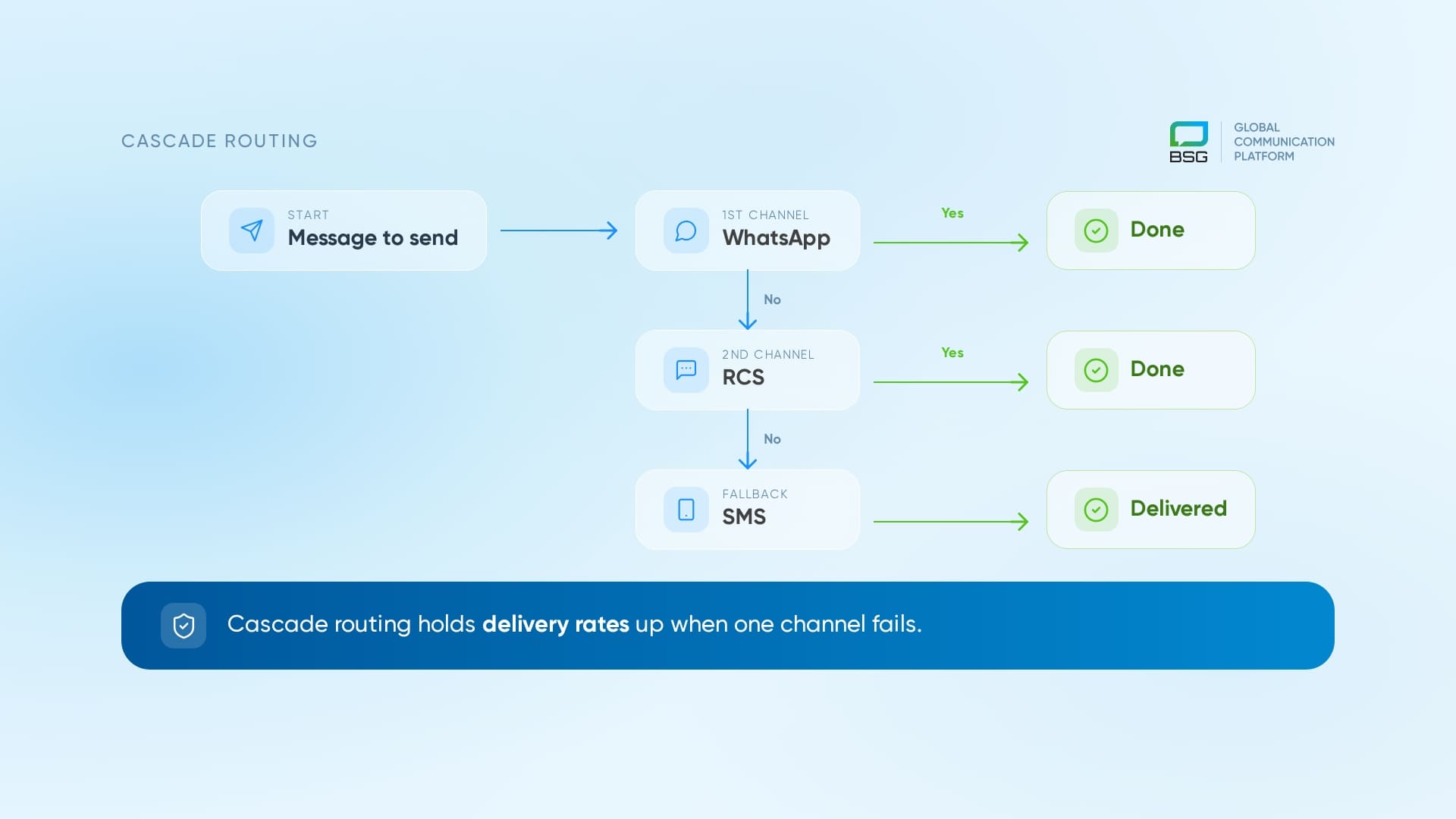
The capability that separates infrastructure from a dashboard is cascade routing: if a WhatsApp message can't be delivered, the system automatically retries on the next channel — RCS, then SMS — until it lands. What our clients have found is that cascade configuration is what holds delivery rates up when a single channel wobbles, especially for time-sensitive messages like codes and order alerts. A provider that runs its own routes and SMS infrastructure can offer this natively; a reseller usually cannot.
Start With the Right Setup
If you're weighing the WhatsApp Business API for a real workload — order flows, authentication, cross-channel campaigns — the integration and provider choice matter more than the channel itself. BSG runs its own platform, direct carrier routes, and cascade fallback across WhatsApp, RCS, and SMS, with onboarding measured in hours, not weeks. Talk to the BSG team about your use case, and we'll map the setup and cost model to your volume before you commit.
FAQ
What is the difference between the WhatsApp Business API and the WhatsApp Business app?
The app is a free, manual tool for small teams using a single phone. The WhatsApp Business API is a programmatic connection for sending and receiving messages at scale through your own systems or a provider's platform. The API has no interface of its own and is accessed through a Business Solution Provider.
How much does the WhatsApp Business API cost in 2026?
Since July 2025, WhatsApp charges per delivered message, not per conversation. Marketing messages are the most expensive, utility and authentication messages cost far less, and customer-initiated service messages are free within a 24-hour window. Exact rates depend on the recipient's country and message category.
Do I need a developer to set up the WhatsApp Business API?
You need some technical setup — connecting webhooks and your backend — but a strong BSP absorbs most of it. Business verification, number provisioning, and template approval are guided, and transactional messaging can be live within a day once templates are approved.
Can I use my existing WhatsApp number for the API?
You can use a new or ported number, but it can't be tied to an existing personal or WhatsApp Business app account. Once a number is bound to the API, it no longer works in the consumer app.
What happens if a WhatsApp message can't be delivered?
On a single-channel setup, it simply fails. With cascade routing, the message automatically retries on another channel — such as RCS or SMS — so time-sensitive messages still reach the customer. This fallback is a main reason businesses choose a provider that runs its own messaging infrastructure.
Is the WhatsApp Business API worth it for transactional messaging?
For businesses in markets where WhatsApp is a primary channel, yes — utility-category messages are inexpensive and reach customers who ignore email. Pairing WhatsApp with an SMS fallback protects delivery when connectivity drops.


Interested in a special offer?
Ready to reach further?
Let’s talk


Related articles
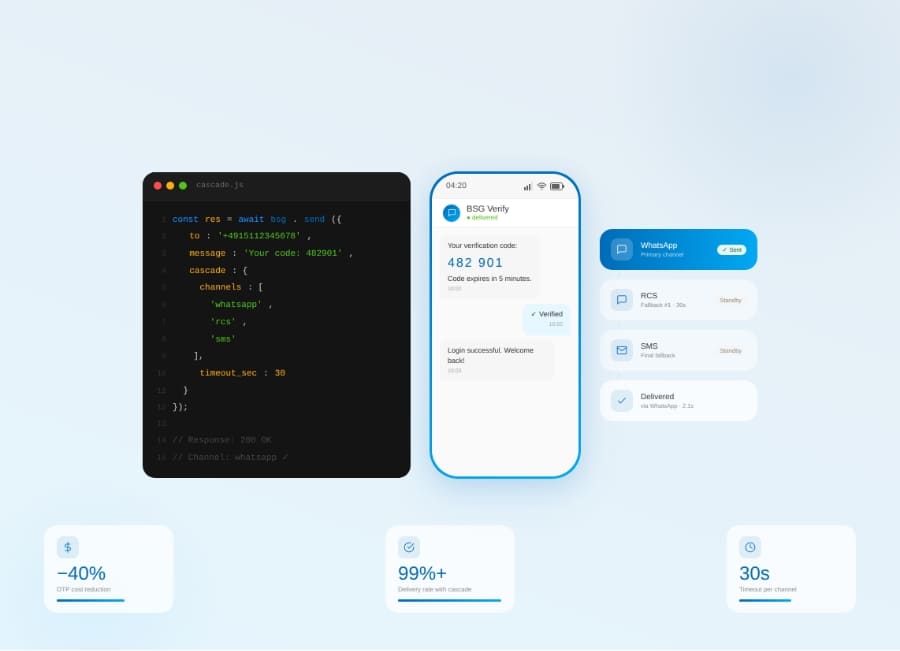
Server-side cascade routing across WhatsApp, RCS, and SMS — how it cuts OTP costs 20–40% with one API call.
Companies deciding to employ SMS marketing strategy want to create effective texting lists. For this
RCS vs SMS in 2026 — when to use each, how cascade routing works, and the real cost gap.